We hear a lot about the massive computing power driving today’s AI advancements. The industry has made incredible strides using powerful, cloud-based frontier models to solve complex problems.
But as AI adoption grows, independent builders, growing teams, and anyone intimidated by unpredictable enterprise bills often feel left out. Does every single AI interaction require routing through a massive cloud server? The good news is that you don't need a huge budget to deploy capable AI. We just need to right-size our approach.
At its most basic, distributed intelligence is the idea that AI workloads can and should be right-sized, solving defined problems by pushing specific tasks securely to the edge (local hardware).
I had a go at building this architecture myself and decided to share my approach here, not just as an engineering exercise, but to show teams of any size that there is an accessible, practical alternative. Edge computing has always been a core part of how the internet works, but only recently have we had the ability to run highly capable language and prediction models locally without needing huge server racks.
To put this into practice, I engineered a self-hosted AI assistant for my personal portfolio website with zero ongoing cloud costs. I wanted an interactive assistant that could answer questions about my 15 years in growth strategy, performance marketing, and tech partnerships in real time.
Rather than relying on a public API, where a sudden spike in traffic or bot abuse could result in a massive, unexpected bill at the end of the month, I built a system that runs entirely on a consumer-grade Mini PC in my home office, drawing less than 35 watts of power. I’ve detailed below how I built this, and the decisions I made along the way to maximize security, reasoning, and speed.
The 3-Tier Architecture Framework
This kind of local AI setup requires the different parts of a system to talk to each other perfectly. The public web layer, the local home server, and the AI model itself all need to coordinate. Here’s the exact path a request takes from start to finish:
- User Query: A visitor submits a question on the static frontend (the visible part of the website, hosted on Cloudflare Pages).
- Edge Security: The query pairs with a Cloudflare Turnstile token to prove the user is human.
- Secure Routing: Cloudflare routes the data over an encrypted tunnel to my home office.
- Backend Validation: A FastAPI program (inside a Proxmox virtual Linux container) checks the token to ensure it is valid.
- Context Injection: The program wraps the user's question into a structured text prompt and sends it to Ollama (the software running the AI).
- Payload Delivery: Ollama generates the answer locally and sends it back to the browser in about 5 seconds.
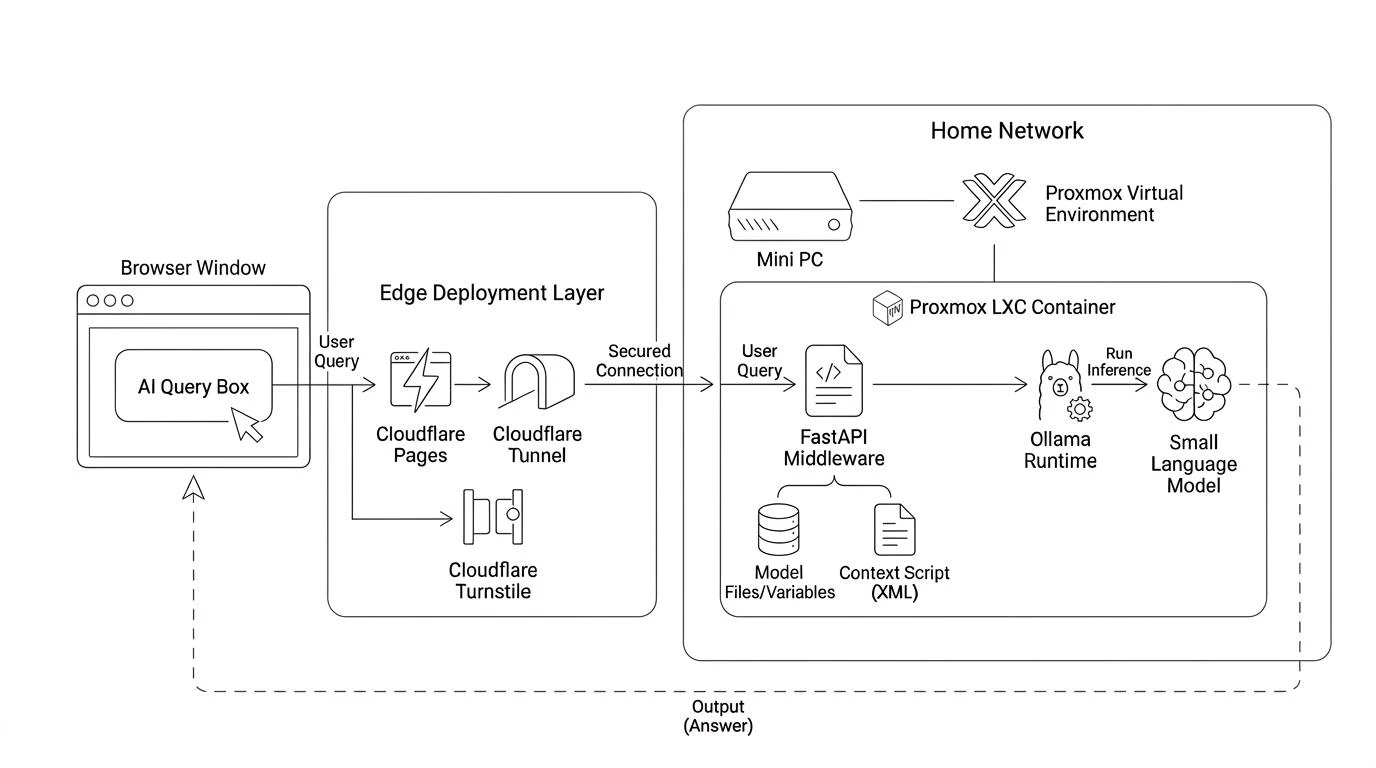
Step 1: Enterprise Security on a Home Office
The trickiest part of this architecture is connecting the public internet to local hardware securely. To ensure this setup met professional standards, I audited the site using Mozilla's MDN HTTP Observatory—a notoriously strict security scanner—where it achieved an A+ rating.
- Cloudflare Pages: This hosts the website files on a global network, ensuring instant page loads for users anywhere.
- Cloudflare Tunnel: Instead of opening ports on my home router (which is a major security risk), this tool creates an encrypted, outbound-only connection from my home office to Cloudflare. My local firewall remains completely closed to the outside internet.
- Turnstile Bot Defense: I integrated token validation directly into the backend code. Every request must pass a human verification check before reaching my local hardware. This stops bots from eating up my server's processing power.
Step 2: Right-Sizing the Hardware
While I regularly work with an NVIDIA DGX Spark, and a desktop PC with a 5090 GPU, using that kind of heavy-duty hardware to run a small text assistant would be a complete waste of resources. That level of compute isn't just laying around in most growing businesses either, and I wanted to prove this could be done with the most basic hardware.
True efficiency requires right-sizing your hardware. The backend runs on a Beelink SER8 Mini PC, which was already running my home automation server and some lightweight Python dashboards (each in their own LXCs). The fact that this mini PC handles all of those existing tasks concurrently with the new AI assistant—all while drawing under 35 watts—proves just how efficient edge AI can be.
- Isolated Linux Container (LXC): The AI service lives inside a dedicated virtual container. Containers share the host system's core software, giving near-bare-metal speed with almost zero overhead. It runs unprivileged, meaning it is completely isolated from the rest of my server for security.
- CPU Thread Pinning: I configured the system to use 6 of the 8 available processor cores. This hits peak generation speed while leaving 2 cores free for background tasks, keeping the system from freezing.
- The 35-Watt Advantage: Because I used a quantized (compressed) version of the Llama 3.2 model, it only needs about 2.2 GB of memory. It fits comfortably in standard system RAM, completely removing the need for an expensive, power-hungry graphics card (GPU). The whole system runs whisper-quiet at 30–35 watts under load.
Step 3: Model Selection & Context
Small language models are fast and light, but they need tight boundaries to stay factual. This required two highly intentional choices.
Picking a Model: When picking a small model, it is tempting to choose the most powerful model your system can run. Open models like Qwen are incredibly fast. However, effective AI deployment hinges on "boundedness", a model’s ability to strictly follow instructions without wandering off-topic or making things up. In testing, Llama 3.2 proved far more reliable at respecting strict guardrails. Staying on script while still being creative and having good reasoning was critical for me.
Context: Most local AI setups default to Retrieval-Augmented Generation (RAG), which is a method of searching a database for answers before generating text. RAG is brilliant for massive company databases, but I wanted to keep my professional history and instructions lean, and they total about 1,500 words. This fits easily inside Llama 3.2’s native memory window. By injecting the text directly, I bypassed the need for complex databases and the delays that come with searching them.
Indexing with XML: Rather than feeding unstructured text into the system prompt, this setup uses a structured XML Context Vault. Modern context engineering relies on XML tags as semantic boundaries. For small language models, explicit XML tagging helps the model's internal attention mechanism cleanly separate background identity, historical facts, behavioral frameworks, and negative constraints.
By partitioning the prompt into distinct XML nodes—categorizing data into isolated blocks for identity metadata, personal philosophy, chronological history, and operational boundaries, the model can index and parse context tokens with high precision. This structural clarity ensures the model knows exactly where to retrieve specific information while keeping strict behavioral rules isolated from reference text.
Step 4: Optimizing for Speed
By making careful adjustments to how the system uses memory and processes text, the AI guarantees a fast, responsive user experience.
- Synchronous Execution: The system returns a complete, fully rendered response in about 3 to 5 seconds. This keeps the website code simple and ensures the page layout doesn't jump around while loading.
- Persistent Memory Allocation: I set the model to stay permanently loaded in the computer's RAM. This completely eliminates the "cold-start" delay that usually happens when a new request wakes an idle model up.
- Temperature Control: Setting the temperature (which controls creativity) to a very low
0.15heavily restricts the model's randomness, minimizing made-up facts and speeding up how fast it selects words.
The Takeaway
I predict we'll continue to see this trend of distributed AI become more widespread, with engineers and strategists well positioned to bring this thinking to growing teams that are keen on adopting AI thoughtfully.
That said, I don’t think massive cloud infrastructure is going anywhere; it makes sense for complex reasoning and heavy enterprise workloads. However, success will be judged increasingly on our ability to use these right-sized edge architectures to build cohesive strategies that perform better for more people, at much lower costs.
Go ask the AI on my home page about my experience building tech partnerships and driving growth, and see firsthand how fast local AI can be. If you want to talk about right-sizing your team's AI infrastructure, let's connect.